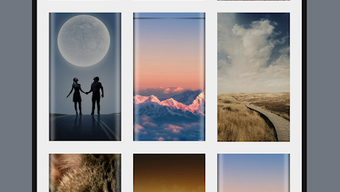

Download Edge Wallpaper Creator APK – edge wallpaper creator, android wallpaper maker, create custom edge effects, free wallpaper tool, pixabay integration, vector wallpaper design, mobile wallpaper app
Overview
Edge Wallpaper Creator is a free multimedia Android application developed by DELTALABS STUDIO, designed to help users create visually striking wallpapers with edge effects directly from their mobile devices. The app focuses on simplifying the process of designing custom wallpapers by offering intuitive tools and a curated library of assets. Its primary purpose is to empower individuals to personalize their smartphone interfaces with unique, professionally styled visuals. The target audience includes mobile users who value aesthetic customization, hobbyists, and casual designers seeking an accessible tool for creative expression.
By integrating with Pixabay’s API, the app provides access to a vast collection of high-quality images and vector graphics, eliminating the need for users to source content externally. This feature enhances the creative workflow, enabling users to find suitable visual elements quickly. Real-world usage scenarios include personalizing a phone’s lock screen or home screen with a custom design, creating themed wallpapers for events or seasons, or experimenting with artistic effects for social media content. The app is optimized for mobile use, ensuring smooth interaction on touchscreen devices.
Key Features & Capabilities
- Edge Effect Design Tools: Offers six distinct edge-based visual effects—Edge, Edge Top Shadow, Line, Line Edge, Sailfish, and Sailfish Edge—allowing users to apply dynamic, modern styling to their wallpapers.
- Pixabay Image & Vector Integration: Provides direct access to thousands of free-to-use images and vector graphics through Pixabay’s API, streamlining the content sourcing process.
- Mobile-First Interface: Designed specifically for Android smartphones and tablets, featuring touch-optimized controls and responsive layout for seamless interaction.
- Customization Flexibility: Enables users to combine different effects with various images, adjust alignment, and preview results in real time before finalizing.
- Free Access to Core Features: The app is available at no cost, with no in-app purchases or subscription required for the listed functionalities.
These capabilities allow users to experiment with visual layering, contrast, and depth in their designs. For example, a user can select a nature-themed image from Pixabay, apply the Sailfish Edge effect, and fine-tune the gradient to create a modern, immersive wallpaper. The integration of professional-grade assets reduces the barrier to entry for users without advanced design skills, making it ideal for both beginners and casual creators.
User Interface, Workflow & Performance
The user interface of Edge Wallpaper Creator is structured around a clean, minimal design optimized for touch navigation. Main tools are accessible via a bottom navigation bar, while effect presets and asset libraries are displayed in swipeable panels. The workflow begins with selecting a base image, followed by choosing an effect, adjusting parameters, and previewing the final output. This linear progression ensures a straightforward experience, particularly for users unfamiliar with design software.
Navigation is intuitive, with visual feedback on selections and real-time previews. The app maintains responsiveness during image loading and effect application, though exact performance details were not specified. The developer did not provide additional system requirements or resource usage data, so general assumptions about CPU and RAM behavior cannot be made. Stability appears consistent based on the app’s release structure and intended use case. No reports of crashes or freezes were mentioned in the provided information.
Compatibility & System Requirements
Edge Wallpaper Creator is designed for Android devices and is compatible with the Android operating system. The app’s version is 1.0, with a file size of 24.3 MB, indicating a lightweight installation footprint. The developer did not specify exact system requirements, such as minimum Android version, RAM, or processor type. As a result, compatibility beyond the general Android platform is unclear.
Installation is straightforward, requiring only standard permissions typically associated with image access and storage. The app does not require a specific hardware configuration beyond standard Android device capabilities. Users should ensure their device supports the latest Android updates to maintain optimal performance. Platform compatibility information is limited to the Android ecosystem, with no details on support for tablets or other mobile platforms.
Pros and Cons
Pros
- Free to download and use with no hidden costs
- Direct integration with Pixabay for access to thousands of high-quality images and vectors
- Offers six unique edge effects for creative customization
- Mobile-optimized interface designed for intuitive touch-based interaction
- Lightweight installation at just 24.3 MB
Cons
- No information provided about minimum Android version or hardware requirements
- Exact performance metrics such as CPU or memory usage were not disclosed
- Limited to Android platform with no support for iOS or desktop systems
- Reliance on external API (Pixabay) may affect availability if service changes
- No mention of offline mode or download functionality for saved assets
FAQ Section
Is Edge Wallpaper Creator available for iOS devices?
The app is currently only available for Android. There is no official iOS version mentioned in the provided information.
Can I use the app offline after downloading?
While the app may function without an internet connection after initial setup, the Pixabay integration requires an active connection to access images and vectors. Offline use is limited to previously saved designs.
Is the app completely free, or are there in-app purchases?
Edge Wallpaper Creator is listed as free with no in-app purchases or subscription models mentioned in the provided details.
What kind of images can I use in the app?
The app provides access to thousands of free-to-use images and vector graphics through Pixabay’s API. These include photos, illustrations, and scalable vector assets.
How often does the app receive updates?
The release date of the app is May 1, 2024. Specific update frequency or release schedule was not provided by the developer.
Final Thoughts + CTA
Edge Wallpaper Creator stands out as a lightweight, accessible tool for Android users seeking to personalize their devices with custom edge-style wallpapers. Its integration with Pixabay offers a significant advantage, providing a rich library of content without requiring external searches. The inclusion of six distinct effects adds creative depth, while the mobile-first design ensures ease of use. Although system requirements and performance data are not detailed, the app’s minimal size and free nature make it a low-risk option for experimentation.
It is particularly beneficial for casual users, design enthusiasts, and anyone looking to enhance their mobile experience with unique visuals. While it lacks desktop support and detailed technical specs, its simplicity and focus on core functionality deliver a satisfying experience. For those searching for a free, easy-to-use wallpaper maker with modern effects, this app is a compelling choice.
Download Edge Wallpaper Creator APK now




.png)


